.png)
Welcome to Walt
What Walt is and how to use it: everything about the app’s main features, its new name, as well as how to create an account, check your balance, and view your assets.
- About Walt
- Account and addresses
- Assets, balance, and transaction history
- App settings
- Security, access, and usage rules
- Walt support and news
We recently renamed the “Wallet” app to Walt. If you used Wallet before, nothing changes for you — your account, assets, and products are preserved. For more on the new name, answers to frequently asked questions, and where to find Walt now, read the article “Wallet is now Walt: everything you need to know”.
About Walt
What is Walt
Walt is a multi-chain platform for working with crypto assets inside Telegram. With it, you can send, exchange, buy, and sell cryptocurrency, as well as store assets and earn rewards.
What can you do in Walt
In the Walt app, you can:
- Store, send, and receive cryptocurrency on supported networks.
- Buy and sell cryptocurrency with a bank card.
- Exchange crypto assets within the app.
- Trade on the P2P Market.
- Buy tokenized US stocks and ETFs.
- Trade perpetuals.
- Earn rewards by taking part in Earn programs and campaigns.
- Participate in the Loyalty Program.
In the Walt app, both a custodial service and a DeFi Account are available — a non-custodial address on the TON network. With it, you can manage your keys yourself and access all the features of the TON ecosystem.
Is Wallet now called Walt
Yes, we renamed the “Wallet” app — it’s now called Walt. It’s the same app with the same products, just under a new name.
Inside Walt, you still have access to:
- the custodial wallet (formerly “Crypto Wallet”)
- the P2P Market
- perpetual futures
- tokenized stocks and ETFs
- Earn programs
- the non-custodial DeFi Account
The only things that changed are the app’s name, its handle (now @walt), the logo, and a few details of how it works inside Telegram.
For example, Walt no longer appears in Telegram settings.
Meanwhile, Walt’s core features work the same as before. Practically nothing changes for you. You don’t need to create a new account, transfer funds, or set up your app again — your account, addresses, assets, balance, and transaction history are all preserved.
For quick and easy access, we recommend pinning Walt in your Telegram chat list or adding it to your Home Screen. Here’s how to do that.
You can find more information about the renaming of Wallet to Walt and answers to frequent questions in this article.
If you come across the names “Wallet” or “Crypto Wallet” anywhere, they refer to the same app and products, now united under the name Walt.
How to open Walt
To open the Walt app:
- Open Telegram and enter the handle @walt in the search bar. In the search results, the Walt name should have a Telegram verification checkmark next to it. That confirms it’s the official account.
- Follow the direct link.
To open Walt faster, you can:
What is a custodial service
A custodial service is a crypto wallet whose access keys are held by the service, not by you personally.
In Walt, we create addresses for you, store the access keys to them, and take care of their security. To use them, all you need is a Telegram account — there’s no secret phrase to write down or keys to manage.
Because Walt holds users’ keys and funds, we monitor account security. To do this, we carry out:
- Verification — identity confirmation that helps make sure it’s really you using the account.
- Transaction review — Walt checks operations to catch suspicious activity in time.
- Enhanced due diligence — in some cases we may request additional information about your account. This helps protect both you and other users from fraud.
Checks like these are standard practice for custodial services.
If you’d rather manage your own keys and address, use the non-custodial DeFi Account on the TON network, also available in Walt.
What is the difference between the custodial service and the DeFi Account in Walt
The Walt custodial service and the non-custodial DeFi Account differ in who controls the keys.
In the custodial service, Walt holds the keys. In the DeFi Account, also available inside the Walt app, only you hold the keys. You alone are responsible for access to the address and the security of your assets.
The DeFi Account is a separate non-custodial service. With it, you can create an address on the TON network right inside Walt, or transfer an existing TON address into our app and manage it from the Walt interface. You can find the DeFi Account’s terms of use here.
Key differences between the custodial service and the DeFi Account in Walt
| Custodial service | DeFi Account | |
|---|---|---|
| Who it's for | Beginners in Web3* and cryptocurrency | Experienced users and those who want to manage their own assets |
| Who holds the keys | Walt holds the keys — you don't need to manage them yourself | You hold the keys — only you have access to them |
| What you can do |
|
|
| Can you connect third-party apps | No | Yes, via TON Connect |
| Can you store NFTs | No | Yes, NFTs on the TON blockchain |
| Where it's available | See the list of unsupported regions here | Available in almost every country |
*Web3 refers to blockchain-based apps and services where users manage their own assets directly, without intermediaries like banks or exchanges.
Are Walt and Telegram connected
The Walt and Telegram apps are separate, independent services.
Walt runs inside Telegram and uses your Telegram account to let you log in to your account in Walt. However, Telegram doesn’t manage the Walt app and isn’t responsible for your assets.
For its part, Walt isn’t responsible for how Telegram works or for the security of your Telegram account.
Who provides Walt’s services
Walt’s services are provided by TG Wallet Inc. (Panama). You can learn more in the User Agreement.
Exception: for residents of the Republic of Uzbekistan, Walt’s services are provided by TGHAMYON LLC (Uzbekistan), which operates under its own User Agreement and terms of use.
Some features in the Walt app are provided by third-party companies. These include, for example, buying and selling cryptocurrency for fiat currency and the non-custodial DeFi Account. Use of these features is governed by the relevant companies’ terms.
Account and addresses
How to create an account in Walt
-
Launch the Walt app — open @walt in Telegram.
Use only Walt’s official Telegram usernames — @walt and @wallet. If you see accounts with similar names, don’t follow their links or enter your data there.
- Follow the on-screen prompts to create an account.
- Complete basic verification: provide your name, date of birth, and phone number. This is required to start using the Walt app.
- After that, your account will be created, and Walt will automatically generate addresses for all supported tokens.
Later, you’ll be able to raise your verification level and get access to all of Walt’s features.
Where to find your deposit address
- Open Walt.
- On the main screen, tap Deposit → Crypto Deposit.
- Select the token you need — you’ll see the address and QR code for depositing.
Before sharing the address with a sender, make sure you’ve selected the correct network. Otherwise, funds may be lost.
Can I create additional addresses in Walt
No. You can’t create additional addresses in Walt or change existing ones. During registration, addresses for supported crypto assets are created automatically and assigned to your account.
If you need additional addresses, you can create them on the TON network and manage them yourself through the non-custodial DeFi Account inside Walt.
Can I add an existing address to Walt
It depends on which address you mean.
If it’s a custodial address — no. It can’t be added to Walt. Likewise, a custodial address created in Walt can’t be transferred to another service.
This is a standard feature of custodial services, which create addresses for their users, store the access keys to them, and manage them independently. That’s why custodial addresses can’t be transferred or used in another app.
If it’s your non-custodial address on the TON network, it can be imported into the DeFi Account inside Walt. To do this, enter that address’s secret phrase — once imported, you’ll be able to manage it through the Walt app.
Assets, balance, and transaction history
Which assets does Walt support
In Walt, you can work with different types of crypto assets as well as tokenized stocks and ETFs. The app offers:
- Supported tokens — cryptocurrency you can deposit, withdraw, store, and exchange (for example, GRAM (formerly TON), USDT, BTC, ETH, and SOL).
- Trading assets — tokens you can buy, sell, exchange, and store in Walt, but can’t yet deposit or withdraw.
- Tokenized stocks and funds — tokens whose value is pegged to the price of real US stocks and funds.
You can learn more about all the assets available in Walt in this article.
The Walt custodial wallet doesn’t support all cryptocurrencies and doesn’t work with NFTs. Before depositing, always check that the asset you need is on the list of assets available for deposit. If it isn’t, the funds won’t be credited.
If you want to store other tokens or NFTs on the TON network, use the non-custodial DeFi Account inside Walt. It supports all TON blockchain assets.
Where to view your balance and assets
Walt’s main screen shows your total balance across all your assets.
To view the balance of a specific cryptocurrency, token, stock, or ETFs, open the Crypto or Stocks & ETFs section.
Why I don’t see all my assets in the balance
If you don’t see a particular asset, that doesn’t mean it’s gone. Walt automatically hides assets with a small balance.
If an asset’s balance is between $0.01 and $1, it collapses into the Other assets section. Just tap that section to see their balance.
If an asset’s balance is less than $0.01, it won’t appear in the asset list on the main screen. To view its balance, open the Trade section, search for the token you need, and go to its page.
Note about your balance: assets with a balance under $0.01 are still counted in your total balance. That’s why the total balance on the main screen may be higher than the sum of the assets shown in the list.
Where to view your transaction history
- Scroll down Walt’s main screen to the Transaction history button and tap it.
- A list of all operations on your account will open.
- Tap any operation to see the details.
You can’t delete an individual transaction or clear your transaction history.
If you need a file with your transaction statement, check out this guide.
How to get a transaction statement
We can send you a file with a statement of your transactions in Walt.
Contact our support team and specify the period for which you need the statement. When you reach out, we will ask you to:
- Briefly explain why you need the statement.
- Complete a Liveness Check.
- Send a screenshot of the request, if the statement is needed for an organization. For example, a letter from a bank or tax authority.
We will review your request and let you know whether we're able to provide this statement.
Where to view your asset returns
Your overall returns across all assets appear right below the Balance field on Walt’s main screen. It can show data for the last 24 hours or all time. Tap the current value to switch between these modes. Tapping again returns to the previous view.
To view returns for a specific asset, scroll down to the Crypto or Stocks & ETFs sections. Returns are shown next to each asset’s name.
You can learn more about how returns are calculated in this article.
App settings
How to change the language and currency in Walt
To change the language:
- Open Settings — on the main screen, tap the three-dot icon (⋯) in the top right corner.
- Go to the Language section.
- Scroll through the list and select the one you need.
To change the fiat currency your balance equivalent is displayed in:
- Open Settings — on the main screen, tap the three-dot icon (⋯) in the top right corner.
- Go to the Default currency section.
- Select the currency you need.

Note about fiat currency: Walt doesn’t work with fiat funds (rubles, dollars, or other national currencies). Amounts shown in your chosen fiat currency are for reference only. They help you gauge the approximate value of your crypto assets in a familiar currency.
How to add Walt to the Home Screen
You can add Walt to your device’s Home Screen to open it with a single tap — without searching through Telegram chats.
To do this:
- Open Walt’s Settings. On the main screen, tap the three-dot icon (⋯) in the top right corner.
- Tap Add to Home Screen.
- Confirm the addition.
After that, the Walt icon will appear among the apps on your device’s screen — and you’ll be able to launch Walt with a single tap.
Why Walt won’t add to the Home Screen
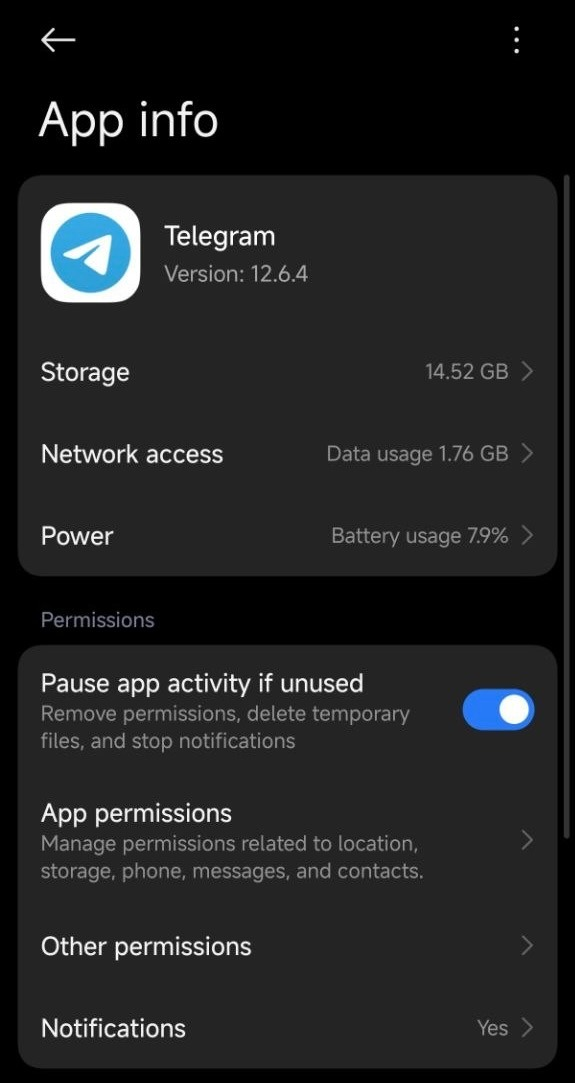
If Walt won’t add to the Home Screen, the Telegram app most likely doesn’t have permission to create desktop shortcuts. This issue can occur on some Android devices.
To enable the permission:
- Open your phone’s Settings.
-
Go to Apps → Telegram → App info.
-
Enable the permission for Home screen shortcuts.
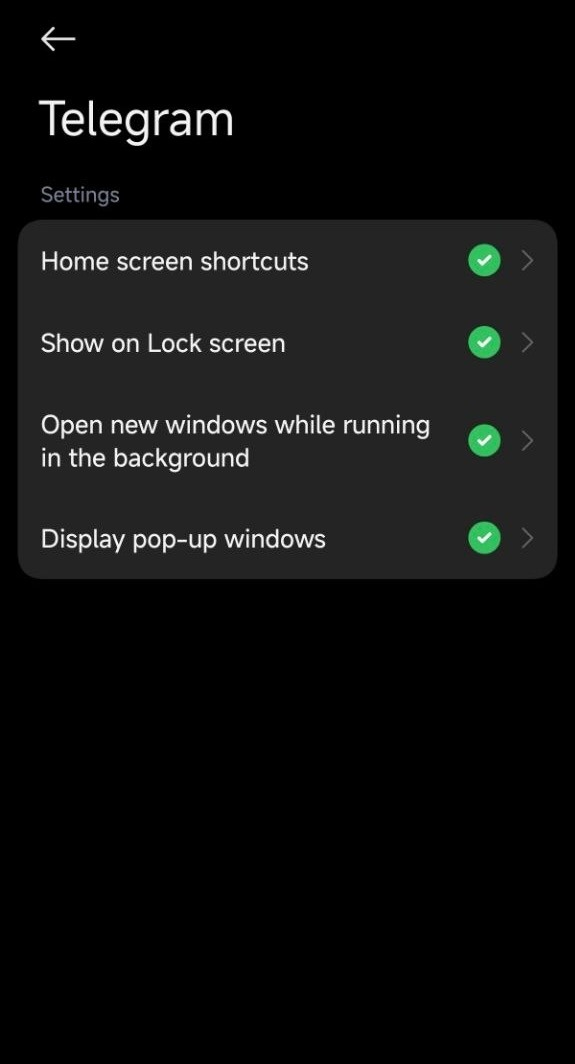
Note: the button’s name may vary by device. If you don’t see "Home screen shortcuts", try looking for similar options, such as "Create shortcuts" or "Install shortcuts".
- After that, go back to the Walt app and repeat the steps from the “How to add Walt to the Home Screen” instructions.
How to unsubscribe from Walt notifications
You can only turn off optional notifications. To do this:
- Open Walt’s Settings. On the main screen, tap the three-dot icon (⋯) in the top right corner.
- Go to the Notifications section.
- Select the notification categories you want to turn off:
- Market trends
- Product updates
- Marketing campaigns
- Educational content
- Feedback requests
Note: you can’t turn off transaction and security notifications. They let you know in time about operations on your account and events related to its security.
How to update Walt
You don’t need to update Walt manually.
The Walt app runs inside Telegram and updates automatically along with it. So to use the latest version of Walt, just update Telegram to the latest version.
What to do if Walt isn’t working
If the Walt app won’t open, is showing errors, or is frozen, take the following steps:
Note: the Walt app doesn’t work in unofficial Telegram clients or in Telegram for Linux.
- Update Telegram and your operating system to the latest version.
- Refresh the Walt page: inside the app, tap the three dots in the top right corner → Reload Page.
- Fully close Telegram through your app manager, then reopen it and launch Walt.
- Switch your internet connection method. For example, switch from mobile data to Wi-Fi or vice versa.
If the problem persists, clear the cache of the built-in mini-browser (WebView).
Note about clearing the cache: if you have a DeFi Account, before clearing the cache, save your recovery phrase or make sure you’ve enabled email recovery. Otherwise you may lose access to your DeFi Account.
- How to clear the cache on Android: Settings → Apps → Android System WebView → Clear cache.
- How to clear the cache on iOS: Telegram → Settings (tap 10 times) → Clear WebView Cache.
If Walt still isn’t working after this, contact our support team. Include your device model, operating system version, and the versions of Telegram and WebView. This will help us resolve the issue faster.
Security, access, and usage rules
How to use Walt without violating the rules
To use Walt without violations, follow a few rules:
- Use Walt only for personal purposes and don’t share your account login details with anyone else.
- Complete any additional checks we may request promptly, and provide accurate information.
- Only use Walt if you’re 18 years of age or older.
- Use only one Walt account.
- Only use Walt in countries where the service is available.
- Follow the User Agreement and the P2P Market Terms of Use.
- Be careful and watch out for fraud schemes. Never share confirmation codes, your password, your DeFi Account recovery phrase, or other data with anyone.
You can learn more about the possible reasons for access restrictions in this article.
Why do I see the “Account under review” screen
The “Account under review” screen means Walt is conducting an additional review of your account. This is a standard security procedure for custodial services and crypto exchanges.
Review usually takes up to 12 hours. Once it’s complete, you’ll receive a notification in the @walt chat.
In some cases, the review may require additional documents — for example, to confirm your identity, address, or the source of your funds. If this is needed, we’ll let you know in the @walt chat and tell you which documents to provide.
You can learn more about enhanced due diligence in this article, and about verification here.
Which countries is Walt unavailable in
Listed below are the countries and territories where Walt isn’t available.
The list is determined by the User Agreement and depends on local legislation, regulatory requirements, and sanctions programs. That’s why Walt doesn’t yet work in some countries and regions.
The restriction applies if you:
- are located in the territory of the country,
- are a citizen or resident of it.
If this is a temporary situation — for example, you were just passing through or have since moved — you can try to restore access. The restoration method depends on which of the two lists below your country is in.
The US and disputed territories
- The US and its territories: United States of America, American Samoa, Guam, Northern Mariana Islands, Palau, Puerto Rico, US Virgin Islands (St. Croix, St. John, St. Thomas);
- Unrecognized or disputed territories: Abkhazia, Crimea, the Donetsk People’s Republic (DPR), the Luhansk People’s Republic (LPR), Kosovo, Northern Cyprus, South Ossetia, Transnistria.
If you’re not a citizen and not a resident of these territories, and only visited or were temporarily there, see this article. It describes possible ways to restore access.
Other countries and territories
- Europe: Austria, Belgium, Bulgaria, Croatia, Czech Republic, Denmark, Estonia, Finland, France, Greece, Hungary, Iceland, Ireland, Jersey, Latvia, Liechtenstein, Lithuania, Luxembourg, Malta, Netherlands, Norway, Poland, Portugal, Romania, Slovakia, Slovenia, Sweden, United Kingdom;
- Africa: Botswana, Cabo Verde, Democratic Republic of the Congo (Kinshasa), Djibouti, Egypt, Equatorial Guinea, Eritrea, Eswatini, Gambia, Guinea-Bissau, Liberia, Libya, Mali, Mauritius, Rwanda, Sierra Leone, Somalia, South Sudan, Tanzania, Lesotho, Mayotte, Réunion, Republic of the Congo (Brazzaville);
- Asia and the Pacific: Afghanistan, Bangladesh, Brunei Darussalam, Fiji, French Polynesia, Macao, Myanmar, Pakistan, Papua New Guinea, Thailand, Philippines, Syria and Yemen, Wallis and Futuna, New Caledonia;
- The Americas and the Caribbean: Bahamas, Barbados, Belize, Cayman Islands, Curaçao, Guyana, Haiti, Panama, Saint Lucia, Saint Barthélemy, Saint Martin, Saint Pierre and Miquelon, Suriname, Guadeloupe, Grenada, British Virgin Islands, Martinique;
- Other countries and territories: Iran, Cuba, North Korea (DPRK), French Southern and Antarctic Lands.
If you don’t live in these countries and aren’t a resident of them, you can submit documents for review. See here for which documents qualify.
We regularly expand where the Walt app is available. If your region isn’t yet supported, follow updates in this article.
Can I use a VPN
No, you can’t use a VPN, the Tor browser, or similar services to bypass regional restrictions and use Walt. This is stated in the User Agreement.
In addition, such tools can interfere with Walt’s ability to correctly determine your location. This may cause your account access to be restricted by mistake.
If you believe your access was restricted by mistake and you’re located in a supported region, follow the instructions in this article.
Walt support and news
How to contact Walt support
If you have a question, message support in the @walt_support chat.
Describe the situation in your own words and, if possible, attach screenshots. This will help us understand the issue faster.
Note: Walt support never messages you first and never asks for your DeFi Account recovery phrase, confirmation codes, or account access. If someone messages you first claiming to be “Walt support,” it’s a scam.
Where to follow Walt news
Subscribe to our official Telegram channels:
- Walt News — here we share service news, new app features, updates, and giveaways.
- Walt Status — here we report outages, maintenance, and when Walt is back up and running.
- Walt Giveaway Winners — here we publish giveaway results.
- Walt Rewards — here we share news and announcements about the Loyalty Program.
- DeFi Account News — here we share news about the DeFi Account inside Walt, its new features, and the TON ecosystem’s capabilities.